Image modifications
This page describes the profile elements available in Karnak for modifying DICOM image data to remove identifying information.
Overview
Karnak provides two main approaches to protect patient identity in DICOM images:
- Defacing: Automated removal of facial features from CT images
- Pixel Data Cleaning: User-defined masks to remove burned-in annotations and identifying information
Both methods ensure that visual identifying information is removed from images while preserving the diagnostic value of the data.
Defacing
Defacing automatically removes facial features from CT images to protect patient identity.
Supported Images
This profile can only be applied to images with Axial orientation in the following SOP Classes:
1.2.840.10008.5.1.4.1.1.2- CT Image Storage1.2.840.10008.5.1.4.1.1.2.1- Enhanced CT Image Storage
Info
Images with non-axial orientation will be skipped. Currently, the CT images that do not represent the head are not automatically excluded. It is recommended to use conditions to restrict defacing to head CT images only.
Configuration
This profile element requires the following parameters:
| Parameter | Description | Required |
|---|---|---|
name |
Description of the action applied | Yes |
codename |
Must be clean.recognizable.visual.features |
Yes |
condition |
Condition to evaluate if this profile element should be applied | No |
Pixel Data Cleaning
Pixel data cleaning applies user-defined masks to DICOM images to remove identifying information burned into the pixels, such as patient or institution information.
Condition for Automatic Application
This profile is automatically applied to the following SOP Classes:
1.2.840.10008.5.1.4.1.1.6.1- Ultrasound Image Storage1.2.840.10008.5.1.4.1.1.7.1- Multiframe Single Bit Secondary Capture Image Storage1.2.840.10008.5.1.4.1.1.7.2- Multiframe Grayscale Byte Secondary Capture Image Storage1.2.840.10008.5.1.4.1.1.7.3- Multiframe Grayscale Word Secondary Capture Image Storage1.2.840.10008.5.1.4.1.1.7.4- Multiframe True Color Secondary Capture Image Storage1.2.840.10008.5.1.4.1.1.3.1- Ultrasound Multiframe Image Storage1.2.840.10008.5.1.4.1.1.77.1.1- VL Endoscopic Image Storage
Or if the tag Burned In Annotation (0028,0301) is set to "YES"
Configuration
This profile element requires the following parameters:
| Parameter | Description | Required |
|---|---|---|
name |
Description of the action applied | Yes |
codename |
Must be clean.pixel.data |
Yes |
condition |
Condition to evaluate if this profile element should be applied | No |
Using Conditions
The condition parameter allows you to apply cleaning selectively. For example, to exclude images from a specific machine that does not add burned-in annotations, you can use the following configuration:
Masks Definition
Masks define rectangular regions to be filled with a solid color, removing any identifying information in those areas.
Mask Parameters
| Parameter | Description | Required |
|---|---|---|
stationName |
Station name to match against DICOM tag (0008,1010). Use * to match any station |
Yes |
color |
Fill color in hexadecimal format (e.g., ffff00 for yellow) |
Yes |
rectangles |
List of rectangles defining the areas to mask | Yes |
Optional Parameters
| Parameter | Description |
|---|---|
imageWidth |
Apply mask only to images with this width in pixels (matches Columns tag 0028,0011) |
imageHeight |
Apply mask only to images with this height in pixels (matches Rows tag 0028,0010) |
Info
When specifying image dimensions, both imageWidth and imageHeight must be set. Defining only one parameter is not supported.
Rectangle Definition
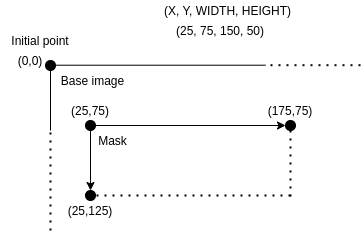
Each rectangle is defined by four values:
| Parameter | Description |
|---|---|
x |
X coordinate of the upper-left corner |
y |
Y coordinate of the upper-left corner |
width |
Width of the rectangle in pixels |
height |
Height of the rectangle in pixels |
The coordinate system starts at (0, 0) in the upper-left corner of the image.
The diagram below illustrates a rectangle with parameters (25, 75, 150, 50):
Mask Selection Process
When processing a DICOM instance, Karnak selects the appropriate mask using the following algorithm:
- Extract image attributes: Retrieve the Rows (0028,0010), Columns (0028,0011), and Station Name (0008,1010) values from the instance
- Exact match: Search for a mask matching all three values (width, height, and station name)
- Station match: If no exact match is found, ignore image dimensions and match only on station name
- Default mask: If no station match is found, use the mask with
stationName: "*"
Example Configuration
Complete Example: Equipment-Specific Cleaning
This example demonstrates a profile that handles specific pixel data cleaning for equipment that burns patient information into the images and does not match the conditions for automatic application.
This profile below performs the following actions for images from a machine with Station Name containing “ICT256”:
- Ensures the Burned In Annotation tag is present and set to “YES”
- Applies pixel data cleaning with a station-specific mask
- Applies the basic DICOM de-identification profile